Before your first Apple Watch workout
Your plan lives in RunCadence on iPhone. Compatible sessions are delivered to Apple's Workout app on your paired Apple Watch; you run them there, then review the results in RunCadence.
- Start with a plan: open a scheduled session in Calendar and check its duration or distance, effort and workout steps.
- Allow workout delivery: grant the requested permission when you enable sending workouts to Apple Watch.
- Allow results to return: give RunCadence permission to read running workouts from Apple Health. Workout delivery and reading completed runs are separate permissions.
RunCadence requires iOS 26.2 or later. Watch delivery also requires a paired Apple Watch and support for Apple's workout scheduling. You can still use your plan and log runs on iPhone without a Watch.
With automatic Watch scheduling enabled, RunCadence maintains eligible scheduled workouts for the next seven days, including today. A later session not appearing yet does not mean the rest of your plan is missing. Sessions without a compatible structured workout cannot be sent.
New to the app? Create your first running plan before setting up workout delivery.
How do workouts get to my Apple Watch?
Compatible RunCadence sessions are sent to your Watch as a structured workout (warmup, intervals, cooldown), with pace or heart-rate targets when included in the prescription.
To run one:
- Open the Workout app on your Watch.
- Scroll to Custom workouts under Outdoor Run (or Indoor Run).
- Tap the workout named like your RunCadence session.
Your Watch will guide you step by step with haptic alerts for each interval transition.
Running a structured workout on your Watch
Once you start the workout on your Watch, Apple’s Workout app guides you through every step.
What to expect:
- Haptic at the start of each step (warmup, interval, recovery, cooldown). The screen shows the target pace and the time/distance for that step.
- Haptic at the end of each step to tell you the next one is starting.
- Live pace, heart rate, and distance on the main metrics screen. Swipe between screens for more data.
- Auto-progression through warmup and cooldown when their duration completes.
You don't need to look at your phone or remember the workout in your head. The Watch tells you what to do, and when. If you need to pause (water stop, traffic light), press the side button and Digital Crown together. See Apple’s workout controls.
When you finish, end the workout using the end-workout controls in the Workout app. It saves to Apple Health and RunCadence picks it up to match the planned session.
The workout isn't showing up on my Watch. What now?
Try these in order:
- Open RunCadence on your iPhone and tap the session in the Calendar.
- Tap Send to Watch: this re-syncs the workout.
- Keep your Watch connected to your iPhone, then reopen the Workout app and check its custom workouts.
- If it still doesn't appear, restart your Watch and try again.
If none of that helps, write to support@runcadence.app with your iOS and watchOS versions and we'll dig in.
My run isn't matching back to the planned session.
RunCadence reads your runs from Apple HealthKit and tries to match them to your planned session by date and distance. If the match is missed:
- Open the session in RunCadence.
- Tap Log.
- Either attach a HealthKit workout manually, or log the session by hand.
For the meaning of your targets, see running pace zones and calibration. If you record on another watch, learn how to import completed runs through Strava.
From your recorded run to the next session
A completed workout tells you what you ran. Your feedback adds what the numbers cannot: whether the effort felt comfortable, whether the terrain changed, or whether next week's schedule is different.
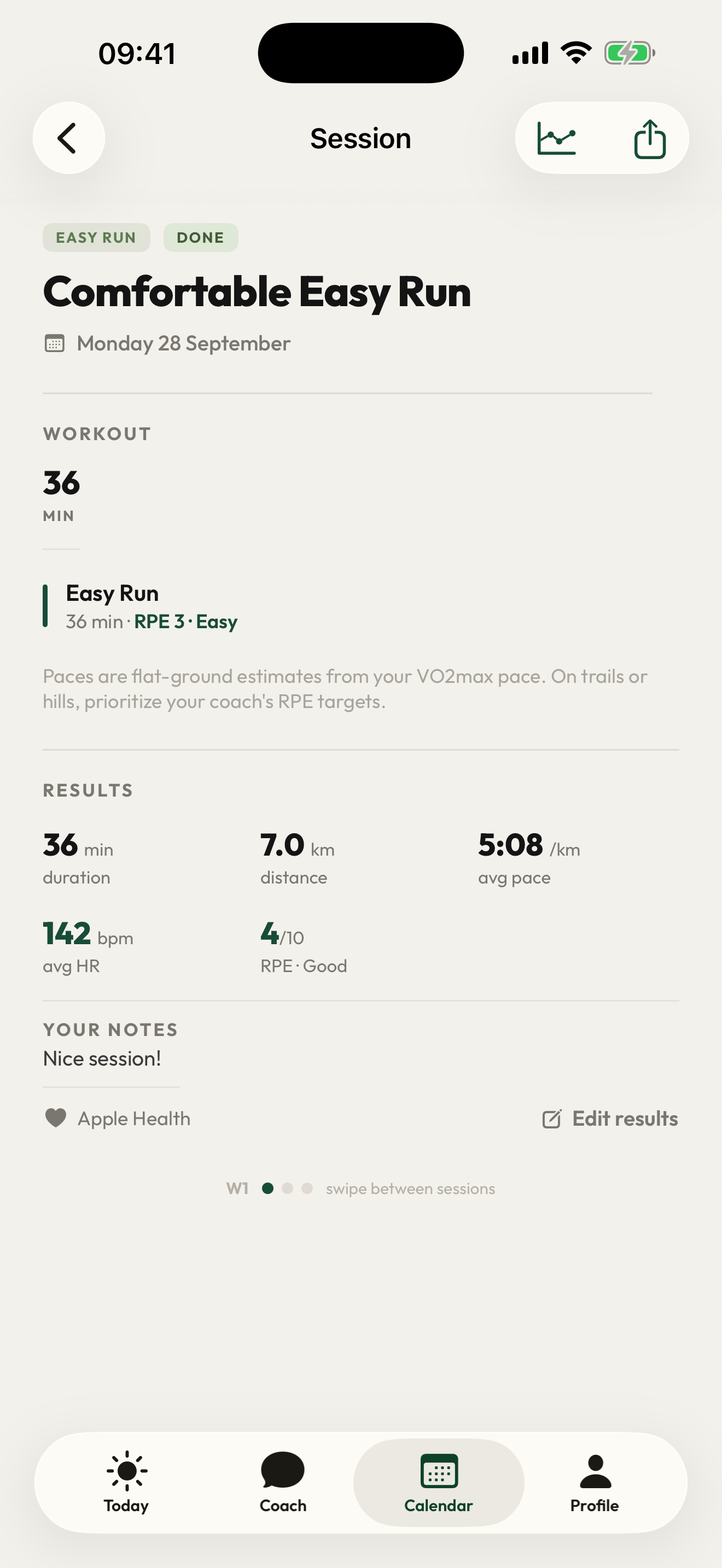
Open the completed session, check the recorded result and add your effort rating and notes. If you need a change, tell the coach what happened and which sessions should stay as they are. Check Calendar after the coach confirms a saved change.
For a concrete example, read how the coach turns a requested session change into a saved update. A recorded run is useful context; it does not mean every remaining session is automatically rewritten.
Still need help?
Write to support@runcadence.app. A real person reads every message.